Review Comments (0) Screenshots (7) Questions & Answers (0) Votes (4) Awards (6) Wiki  
(4)
Fantaisie Software
4.60.0.1309
www.purebasic.com
Shareware
$102  Purchase
165 people
Download PureBasic

25.13 MBDownloaded 720 times

 
Video tutorial for PureBasic 4.6
Frame

Review

This is official description

PureBasic is a native 32 bit and 64 bit programming language based on established BASIC rules.the possibilities are endless with PureBasic's advanced features such as pointers, structures, procedures, dynamically linked lists and much more. PureBasic has been created for the beginner and expert alike.
 
The following review written by one of the Software Informer contributors applies to version 4.2

Pure BASIC is a Basic based language application for easily programming and modify open source basic projects, and creates stand alone executable applications that run under Windows, Amiga and Linux Operating Systems.

The user interface is very easy to use and offers many preferences and options for the users to set according to their own purposes.

Beside the strictly pure Basic concepts and syntax, the application comes with more than eight hundred commands, a good debugger facility, a fast application compiler, local and global variables support, quick access to the Operating System API, a good sysntax editor and the advantage of tracing possible bugs and fix them.

The application includes a very convenient visual designer that makes easier many of the programming steps. It gives the programmer the way to set on a designing 'table' with a grid on it: buttons, text boxes, labels, check boxes, radio buttons selections, folders, frames, Internet direct access, lists and combos, tree view directory views, status bars, scroll bars, hyperlinks, explorer views, etc. all of them are sizeable, to help the programmer in the designing process. It also includes an useful ASCII table and a built-in a CPU monitor.

The result file, when compiled, is totally executable and it doesn't need any auxiliary runtime program, external DLL or code interpreters, and is compiled as a native application in any usual OS, resulting a compact and totally free executable file.

Experts and novices will find this application a friendly way to easily program in Basic language.
  • Complete compiler, good debugger, helpful visual designer facility.
  • Trial version is very limited.

Reviewed by: Ignacio Solves

Reviewer rating:

Reviewed: 3 years ago

What's new in version 4.6

- Added: a brand new '3D' example folder
- Added: 'Joint' library
- Added: 'SpecialEffect' library
- Added: 'StaticGeometry' library
- Added: CameraPitch(), CameraRoll(), CameraYaw(), SwitchCamera()
- Added: ApplyEntityForce(), ApplyEntityImpulse(), EntityPitch(), EntityRoll(), EntityYaw()
- Added: GetEntityAttribute(), GetEntityMaterial(), SetEntityAttribute(), SetEntityMaterial()
- Added: LightDiffuseColor(), SpotLightRange(), LightLookAt(), DisableLightShadows()
- Added: MaterialDepthWrite(), MaterialSelfIlluminationColor(), MaterialShininess(), GetScriptMaterial()
- Added: CreateLine3D(), CreateCube(), CreateSphere(), CreateCylinder(), CreatePlane()
- Added: MeshVertexCount(), UpdateMeshBoundingBox(), MeshRadius(), AddMeshVertex()
- Added: MeshVertexNormal(), MeshVertexColor(), AddSubMesh(), BuildMeshShadowVolume()
- Added: MeshVertexTextureCoordinate(), AddMeshFace(), FinishMesh(), NormalizeMesh()
- Added: SaveMesh(), SetMeshMaterial(), SubMeshCount(), TransformMesh()
- Added: NodePitch(), NodeRoll(), NodeYaw(), GetScriptTexture(), TextureOutput()
- Added: EntityCollide(), RayCollide
- Added: OpenGL renderer to the 3D library on Windows, when using the OpenGL subsystem
- Added: CanvasGadget(), CanvasOutput()
- Added: SetGadgetItemData() for PanelGadget
- Added: MoveElement(), MergeLists(), SplitList()
- Added: RandomizeList(), RandomizeArray(), DoubleClickTime()
- Added: PushListPosition(), PopListPosition(), PushMapPosition(), PopMapPosition()
- Added: ImageID parameter to OpenSubMenu()
- Added: #PB_ListIcon_ThreeState and #PB_ListIcon_Inbetween
- Added: #PB_Tree_ThreeState and #PB_Tree_Inbetween
- Added: crossplatform ComboBox events
- Added: 'DeclareC' keyword for completness

- Changed: FindString() 'StartPosition' parameter to be optional
- Changed: WebGadget to use WebKitGtk on Linux
- Changed: ContainerGadget with #PB_Container_Borderless to no longer add a 2px invisible border on Linux
- Changed: EntityPhysicBody(), CreateLight(), RenderWorld(), ShowGUI(), WorldShadows()
- Changed: EntityMaterial() to SetEntityMaterial()

- Removed: Get/SetEntityMass(), Get/SetEntityFriction()
- Removed: SetMeshData()

- Fixed: Many bugs

IDE:
- Added: IDE options for commandline project building
- Added: monitoring of files for changes on disk while they are open in the IDE
- Added: FilePanel custom implementation with Drag & Drop, Dropdown menu, scrolling also on OSX
- Added: Diff tool for directories/files
- Added: Html help viewer for Linux/OSX
- Added: Help viewer in toolspanel
- Added: new Color Picker tool
- Added: enabled font selection in IDE for OSX
- Added: ProjectPanel now remembers node expanded states
Debugger:
- Added: maximize button to all debugger windows
- Added: all IsXxx() and XxxID() functions to the expression parser (for data breakpoints)

What's new in version 4.5

- Bug-fix release
- Fixed compiler and libraries related bugs
Report a wrong version Report a wrong program title Suggest a correction

Screenshots

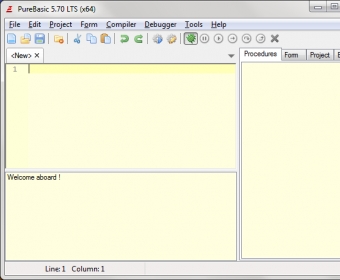
General view General view CPU Graph CPU Graph Initial window Initial window Preferences window Preferences window
All 7 screenshots

Latest comments


There are no comments, be the first one!
Add new comment

E-mail Address:

Password:

Register now »

Forgot password?

Sign in with:
Download Software Informer Client
Copyright © 2012, Informer Technologies, Inc. About| Privacy and terms| Help| Feedback & Support| Partners program